





Why can’t I find the S1 via Bluetooth?


Purpose of this page: If your phone cannot find HISONG S1 Bluetooth in the Bluetooth device list, please check the following 4 steps in order. In most cases, the issue can be resolved in Steps 1–2.
Step 1|Is the S1 powered on and has battery power?
-
Set the S1 side switch to Enhanced Dynamic mode [Middle] or Condenser mode [Right]
-
The [Left] position means the device is powered off
-
Check whether the indicator light is on
If the indicator light does not turn on:
-
The battery may be depleted
-
Charge the S1 for 1–2 minutes, then try again
Step 2|Is “Bluetooth Accompaniment” turned off in the HISONG Link app?
-
Open the HISONG Link app
-
Go to the Tuning page
-
Check the Bluetooth (Bluetooth Accompaniment) toggle in the top-right corner
-
Make sure it is turned ON
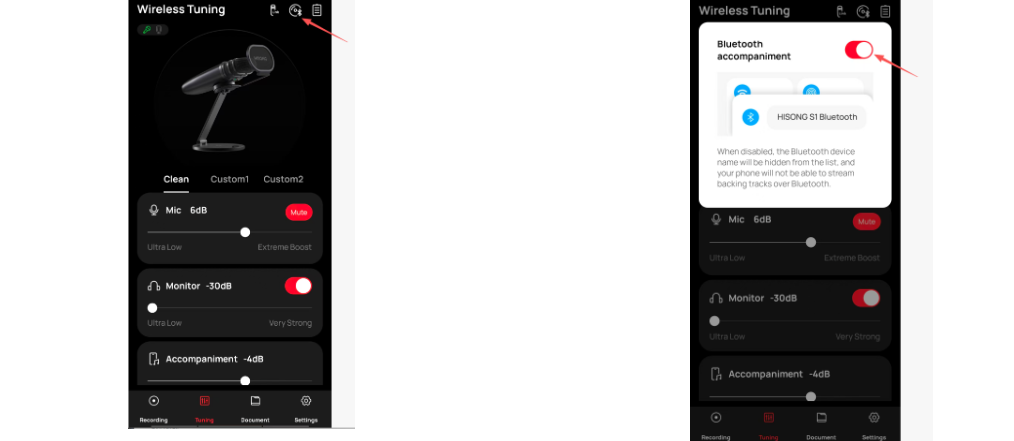
If it was previously turned off:
-
The S1 will not broadcast Bluetooth audio
-
Your phone will not be able to find HISONG S1 Bluetooth
After turning it on:
-
The S1 will resume broadcasting Bluetooth audio and automatically reconnect to HISONG S1 Bluetooth
-
HISONG S1 Bluetooth will appear again in your phone’s Bluetooth device list
Step 3|Are you using “HISONG Link App + USB-C”?
This is normal system behavior, not a malfunction.
If you are currently:
-
Using the HISONG Link App, and
-
Have a USB-C cable connected
The system will automatically:
-
Switch to wired USB audio transmission
-
Disable Bluetooth audio broadcasting
-
Keep Bluetooth only for app control
What you will observe:
-
HISONG S1 Bluetooth does not appear in your phone’s Bluetooth list
-
Other phones also cannot discover the device
How to resolve (choose based on your needs):
-
If you need Bluetooth accompaniment / Bluetooth connection:
-
Close the HISONG Link App or unplug the USB-C cable
-
-
If you need stable recording or tuning:
-
Keep the USB-C wired connection and continue using the app
-
Step 4|Has the Bluetooth discoverable time expired?
The S1’s Bluetooth is not always discoverable.
-
After powering on, it can be discovered by new devices for about 3 minutes
-
If no connection is made within this time, Bluetooth will automatically stop broadcasting
How to resolve:
-
Power off the S1 (set the side switch to [Left])
-
Wait 5 seconds
-
Power it on again (set the switch to [Middle] or [Right])
-
Turn on Bluetooth on your phone and search again
Still can’t find it? Try these two steps
Restart the device
-
Set the side switch to OFF [Left]
-
Wait 5 seconds
-
Set the side switch to Enhanced Dynamic mode [Middle] or Condenser mode [Right]
Restore factory settings (only if necessary)
If you have confirmed that:
-
The device has battery power
-
The app is not open
-
The S1 still cannot be found by any phone
Additional notes (for understanding)
On the HISONG AirStudio S1, Bluetooth is used only for:
-
Providing third-party accompaniment audio during creation, filming, or recording (music, backing tracks, reference audio played from the phone)
Bluetooth is not used for:
-
Main audio recording transmission
-
Audio input for live streaming or filming
-
High-quality audio connection with a DAW
Therefore:
-
When using USB + the app,
-
The system will automatically disable Bluetooth audio
This is intentional, to ensure more stable accompaniment with lower latency.


