





DAW Music Production


Capture clean audio for mixing, production, or mastering — without additional audio interfaces.
-
Connect S1 to your computer, tablet or phone via USB-C.
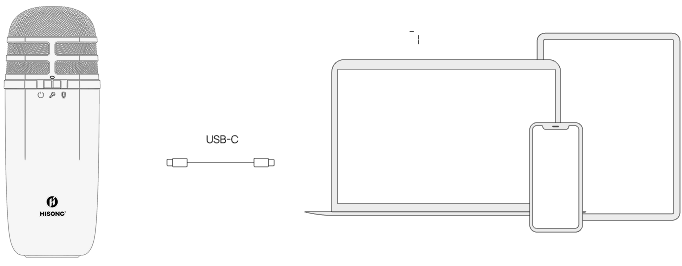
-
Open your preferred DAW and select AirStudio S1 as the input device.
-
Switch off the hardware monitoring by holding "+" and "–" at the same time.
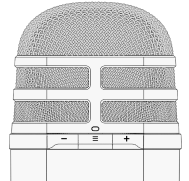 hisonghisong
 -
Activate monitoring on the DAW, create a new track and begin recording.
AirStudio S1 is compatible with major DAWs, including Cubase, Logic Pro, Ableton Live, Garage Band, and more.
Included Software
AirStudio S1 includes a free license for Steinberg Cubase LE and Cubasis LE 3.
Download the software, activate your license, and start producing immediately.
For Cubase LE (MacOs & Windows)
Please follow the instructions on the card included in your AirStudio S1 carry bag. For Windows users only: [AirStudio S1 ASIO Driver]
For Cubasis LE3 (iOS & Android)
Download the app from the Appstore or Google. Connect the S1 via USB-C.
For Cubase LE (MacOs & Windows)
Please follow the instructions on the card included in your AirStudio S1 carry bag. For Windows users only: [AirStudio S1 ASIO Driver]
For Cubasis LE3 (iOS & Android)
Download the app from the Appstore or Google. Connect the S1 via USB-C.


