





How to Pair the Earphones Again


Purpose of this page: Ensure that the left and right earphones are correctly paired with the charging case and with each other.
Applicable scenarios:
-
Only one earphone has sound / left and right channels are out of sync
-
Re-pairing is required after replacing an earphone
Method 1|Hardware Wireless Earphone Pairing
Before starting earphone pairing, make sure that:
-
Set the S1 side switch to Enhanced Dynamic mode [Middle] or Condenser mode [Right] to power it on (microphone ON)
-
Both left and right earphones are placed inside the charging case
-
If only one earphone is inserted, or none are inserted, pairing cannot be performed
-
-
The charging case lid is open
-
Press and hold the “–” button on the charging case for 5 seconds
Method 2|Software Wireless Earphone Pairing
Before starting earphone pairing, make sure that:
-
Set the S1 side switch to Enhanced Dynamic mode [Middle] or Condenser mode [Right] to power it on (microphone ON)
-
Both left and right earphones are placed inside the charging case
-
If only one earphone is inserted, or none are inserted, pairing cannot be performed
-
-
The lid is open
-
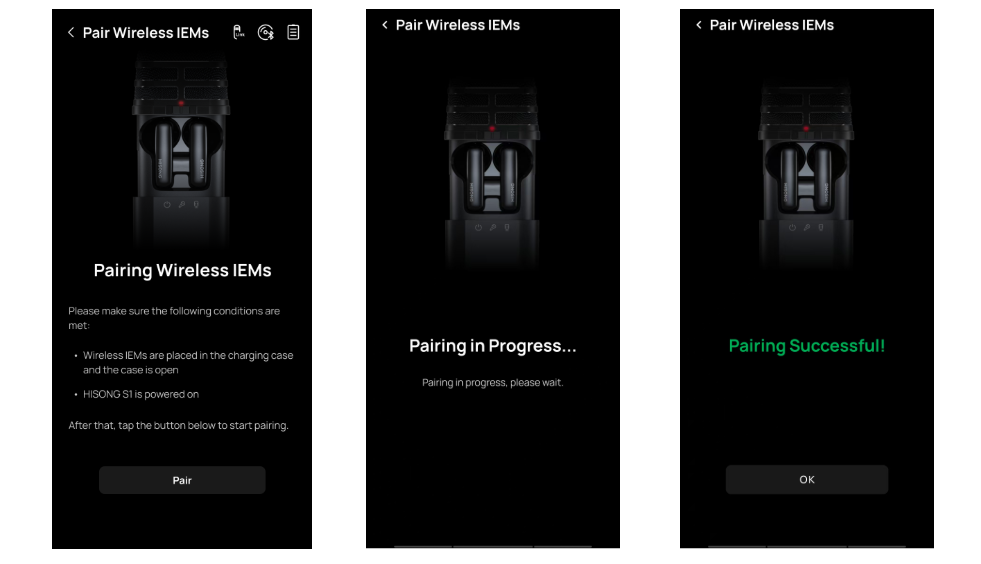
Open the HISONG Link app and go to the Settings page
-
Tap Settings > Device > Pair Wireless IEMs to enter the pairing page
-
Once pairing is successful, “Paired Successfully” will be displayed
What can you do after pairing is complete?
-
Wear both left and right earphones normally for monitoring
-
Start connecting to your phone or other devices
-
Proceed with recording, live streaming, or content creation workflows
⚠ Common Issues & Troubleshooting
Q: Can I pair the earphones with only one earphone in the case? A: No. Both earphones must be placed in the charging case to complete pairing.


