


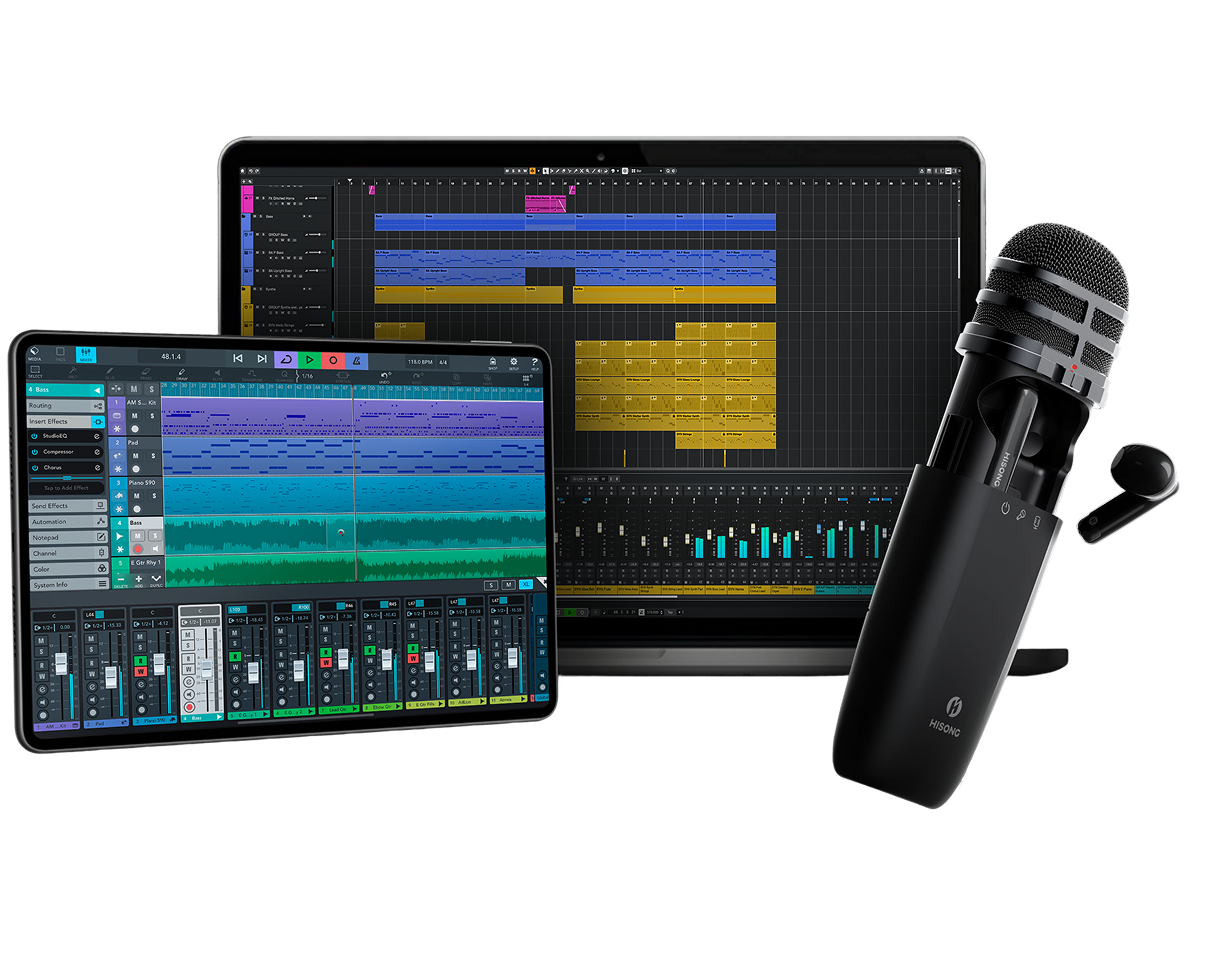
Recording a song demo anywhere comes down to one thing: how fast you can start. The traditional chain of microphone, audio interface, and wired monitoring headphones is built for a studio desk, not for capturing a melody that hits you in a park, a hotel room, or a car. The HISONG AirStudio S1 combines mic capture, audio-interface functionality, wireless monitoring, control, and connectivity into a lighter portable recording workflow — the main unit weighs 0.26 lb, so you can go from idea to editable demo in minutes. Below is the exact workflow.
The scenario is familiar to any songwriter: you're on a train, a melody surfaces, and by the time you'd unpack a microphone, connect an interface, and set up monitoring, the moment—and often the inspiration—is gone. Each additional piece of gear adds setup minutes and one more reason to postpone the recording. Song ideas can be lost when setup takes too long. The fix isn't a better microphone; it's a system that removes the setup from the equation.
What "recording anywhere" actually requires
To record a demo on location, four things must be true at the same time:
• Portability — the entire system fits in a pocket or small bag.
• No separate interface — the microphone connects directly to your phone or laptop via USB-C.
• Wireless monitoring — you hear yourself through the earbuds while you record, with no cable to the device.
• Dual-track output — your vocal and a backing track record as two separate files, not one mixed take.
The HISONG AirStudio S1 is a mobile recording system built around a recording capsule that combines a switchable condenser/enhanced dynamic microphone, a USB-C audio interface, and wireless in-ear monitoring.
The main unit measures 4.90 × 1.42 × 1.42 inches and weighs 0.26 lb, per HISONG's official product page. It records at 24-bit/48 kHz resolution, and ZeroSync™ provides wireless monitoring at 24ms latency — a figure certified by SGS. DualTrack™ records your vocal and a backing track as two separate tracks in real time, as detailed in the AirStudio S1 product documentation. The S1 was named a TIME 2025 Best Invention, and was recognized as a CES 2025 Innovation Awards Honoree under its historical name, HISONG SuperMic S1.
Step 1: Set up your AirStudio S1
Setup is where most mobile recording attempts fail, so the S1 is built to have you recording within minutes rather than after a session of cabling:
Charge the main unit and earbuds. The main unit delivers 10 hours of battery life; the earbuds run 3.5 hours per charge with fast-charge support, per the S1 spec sheet.
Connect via USB-C. Plug the S1 directly into your phone (iOS or Android) or computer (macOS or Windows). No driver is required on macOS or iOS; on Windows, HISONG recommends installing its ASIO driver for the best latency and stability.
Open the HISONG Link App. It carries presets for common recording scenarios so you can skip manual parameter adjustment, plus gain and mic-mode control.
**Put in the wireless earbuds. **They pair directly with the S1 for monitoring — no headphone cable, no separate monitoring hardware to add.
The key difference from a conventional setup: there's no audio interface to power, no headphone amp to connect, and no cable running from your headphones to the mic. The S1 is the microphone, the interface, and the monitoring system in one device.
Step 2: Choose the right mic mode
The S1's capsule switches between two modes via VocalSense™. Choosing correctly for your environment is the difference between a usable take and a noisy one:
• Condenser mode is more sensitive and captures more detail. Use it in a quiet room (a hotel room, a closed car) where you want the full frequency response of your voice.
• Enhanced Dynamic mode is less sensitive to ambient noise. Use it in noisier environments — a park, a street, a coffee shop — where you need to reject background sound and keep the vocal forward.
The capsule is directional either way — cardioid / super-cardioid, per HISONG's spec sheet — so the practical technique is the same: point it at the source and put your back to the noise. For a demo recorded on location, the general rule is to start in Enhanced Dynamic and switch to Condenser only if the environment is genuinely quiet. It's easier to add room tone in the DAW than to remove it from a take.
Step 3: Record vocals with wireless monitoring
The reason most mobile recordings sound hesitant is that the singer can't hear themselves properly. The S1 addresses this with ZeroSync™, which delivers wireless monitoring at 24ms latency — SGS-certified, per HISONG's product specifications. To be clear: this is not zero-latency — 24ms is the specified figure — but it's low enough to sing naturally instead of fighting the lag.
Set the mix so you hear your voice clearly over any backing track. Because the monitoring signal is wireless and comes through the earbuds, you're not tethered to the device. You can hold the S1, place it on a table, or use the magnetic desktop stand that ships in the box. The recording chain is: voice → S1 capsule → USB-C to phone/computer → DAW or HISONG Link App.
Step 4: Add a backing track with DualTrack
A dry vocal on its own is hard to evaluate. DualTrack™ records your vocal and a backing track as two separate tracks in real time over the direct USB-C connection — this is where the S1 behaves like a small recording system rather than a microphone.
• With a backing track: Play the backing through the HISONG Link App or your phone while you sing. The S1 captures your vocal, and DualTrack™ keeps the backing separate from the vocal take, so you can adjust one without re-recording the other.
• Singing and playing at the same time: VocalSense's scenario list includes guitar, and the capsule will pick up your voice and an acoustic guitar together in one performance. Be clear about what you get, though: both land on the same performance track. DualTrack separates your vocal from a backing track, not your vocal from an instrument sharing the same capsule. If you need the guitar isolated for mixing, record it as a second pass over the vocal take.
The result is a 24-bit/48 kHz file pair that imports into a DAW with both elements on separate tracks — the difference between a rough voice memo and a demo you can actually work with.
Step 5: Export and refine
You have two paths from here, and for a demo you'll often use both.
In HISONG Link. The app is where the S1's tracks land first, and it carries a multi-track editing workflow: level, EQ, compression, limiting, reverb and noise reduction, adjustable per track without re-recording anything. For a quick demo, you can finish here.
In your DAW. The S1 connects via USB-C and supports ASIO on Windows, so it works as a standard audio interface with most major DAWs. The dual-track files import directly as separate tracks, so you can:
Adjust levels between the vocal and the backing.
Add effects (reverb, compression, EQ) to the vocal.
Replace the scratch backing with a fuller arrangement if needed.
HISONG bundles Steinberg's Cubasis LE (iOS) and Cubase LE (desktop) with AirStudio series purchases, through an official OEM partnership with Steinberg — so the entry-level DAW is covered without a separate purchase.
One caveat: the S1 is not a magic box that makes recordings ready to publish without editing. It captures a clean, usable take with separate tracks, but mixing and arrangement work still happens afterward. The point is that you've captured the performance on location, with the structure you need to finish the song later.
What a wireless mic system solves, and what a recording workflow needs
Popular wireless microphone systems such as the DJI Mic 3, RØDE Wireless PRO, and Shure MoveMic 88+ make high-quality wireless audio capture easier and more portable. But wireless capture is only one part of a complete recording workflow.
AirStudio S1 takes a more integrated approach by combining a microphone, wireless in-ear monitoring, and audio-interface functionality into one portable system. Instead of relying on separate gear for capturing audio, monitoring, and connecting to a recording device, S1 is designed to reduce the number of devices, cables, and setup steps required to start recording.
For musicians, that can make it easier to move from an idea to a vocal, instrument, or song demo with less setup in between. But the simplified workflow is not limited to music creation. The same integrated system can also support video creation, podcasting, livestreaming, mobile recording, and other content-production workflows where portability and fast setup matter.
The key difference, then, is not simply whether a wireless microphone can record music. It is how much of the recording workflow can be handled by one portable system. By bringing capture, monitoring, and audio-interface functions together, AirStudio S1 is designed around a simpler creative workflow: less gear, fewer steps, and more freedom to create.
The takeaway
Recording a demo anywhere isn't about having better gear — it's about having gear that gets out of your way. The HISONG AirStudio S1 brings the whole recording chain into one portable recording system — the main unit weighs 0.26 lb — and that's what makes mobile recording actually happen. When the idea strikes, you want the shortest path from inspiration to a captured, editable take. That's the S1's job.
If you're a songwriter who's lost ideas because the setup was too slow, the AirStudio S1 is worth a look.
FAQ
Q: Can I use the AirStudio S1 with iOS recording apps like GarageBand?
A: The S1 connects via USB-C and is compatible with iOS, where it appears as a standard audio input device — so it works with iOS recording apps that accept a standard USB audio input. Compatibility can vary by app and OS version; HISONG's support center has the current details.
Q: Is the 24ms wireless monitoring the same as using Bluetooth earbuds?
A: No. ZeroSync™ is the S1's own monitoring path, not a standard Bluetooth audio connection, and HISONG specifies it at 24ms with SGS certification. That's what makes it usable for tracking vocals — though the honest framing is 24ms, not zero.
Q: Does the S1 work with every DAW?
A: The S1 supports ASIO on Windows and is compatible with macOS, Android, and iOS. It works with most major DAWs, but compatibility can vary by DAW version. Check the HISONG support center for specific DAW compatibility details.
Q: What's the difference between the Standard and Universal Pack?
A: Both include the Wireless Audio Receiver (USB-C), which sends the S1's audio wirelessly into a phone. The Universal Pack adds the Universal Wireless Audio Receiver plus adapters for routing into cameras, mixers, and speakers. If you record into a phone or computer, the Standard Pack covers it; add the Universal Pack if you also need camera, mixer, or PA connections.
Share:
Is HISONG AirStudio S1 Worth It? A Balanced Look at Who It Suits and Who Should Skip It