


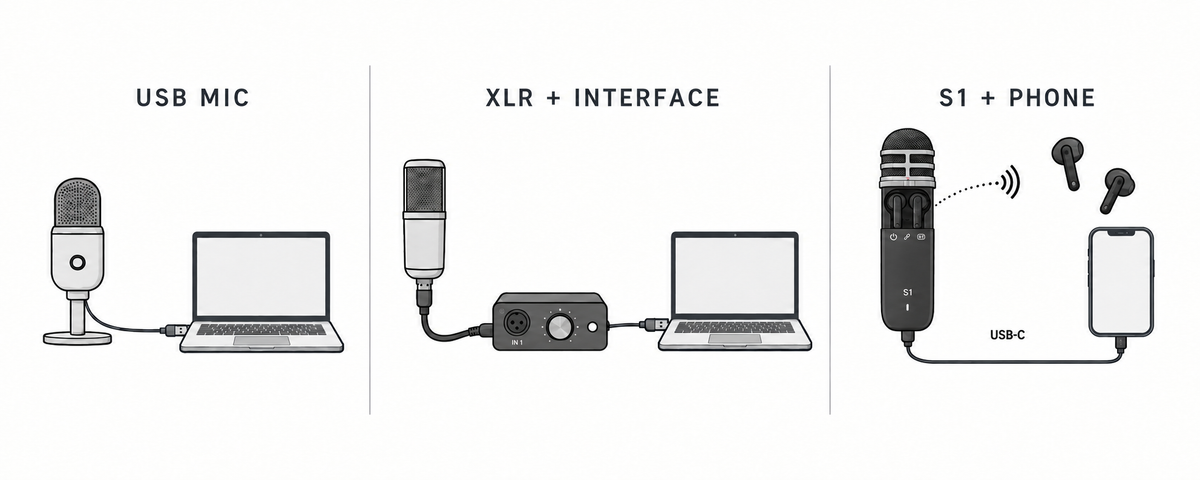

No. To record vocals digitally, you need a microphone, analog-to-digital conversion, and a destination that stores the recording. Monitoring is strongly recommended for performance and level checks, but it is not technically required for every take. A USB microphone or an all-in-one recording system can perform conversion internally. An analog XLR microphone typically needs an audio interface, mixer, or recorder with a suitable microphone preamp and converter; a separate interface becomes especially useful when you need more inputs, controls, or expansion.
The useful question is therefore not "Do serious vocals require an interface?" It is "Which signal chain fits the number of sources, recording location, monitoring needs, and upgrade plans?"
Three common ways to record vocals
USB microphone
A USB microphone combines the microphone and analog-to-digital conversion in one device. Connect it to a compatible phone or computer, select it in the recording software, and begin; adapter, driver, and app support vary by model.
Advantages
Simple signal chain
Fewer purchases and cables
Practical for voice-over, solo podcasting, lessons, and demos
Limitations
Usually one primary input
Microphone and converter cannot be upgraded separately
Monitoring and mobile-device support vary by model
A USB microphone is often enough when you record one voice at a desk and do not expect to add more microphones soon.
XLR microphone plus audio interface
An XLR microphone usually outputs an analog signal, so it normally needs an audio interface, mixer, or recorder with a compatible microphone input, preamp, and converter before a phone or computer can record it.
Advantages
Broad choice of microphones
Interfaces with two or more inputs can record multiple sources
Individual components can be upgraded or replaced
More routing and hardware control in many studio workflows
Limitations
Requires additional cables, monitoring, and often a stand
More settings to understand
Less convenient when moving frequently
This route is often the strongest choice for a permanent desk or studio, especially if you plan to record two vocalists, vocals and an instrument, or several microphones with independent control.
All-in-one portable recording system
An integrated system combines more of the chain into a coordinated workflow. HISONG AirStudio S1, for example, combines switchable condenser and enhanced dynamic microphone modes, built-in audio-interface functionality, wireless in-ear monitoring, HISONG Link control, and receiver-based connectivity. HISONG specifies 24-bit/48 kHz recording and compatibility with macOS, Windows, iOS, and Android. Its DualTrack™ function separates the microphone/vocal signal and a backing track; it does not create two independent microphone inputs or automatically isolate two people, or voice and guitar, captured by the same capsule. S1 records through a connected device rather than onboard storage.
Advantages
Fewer separate components
Easier movement between phone and computer workflows
Integrated monitoring and control
Useful for vocal and guitar demos, interviews, video, livestreaming, and other compact creator workflows
Limitations
Not a substitute for several independent XLR microphone or instrument inputs
Expansion is defined by the system's supported receivers, cables, and software routes
AirStudio S1 records to a connected device; the required receiver or cable depends on the destination and package
This route fits creators who want to record, monitor, and route sound without assembling a desk-based chain for every session, provided the system's independent-input limits match the job.
Side-by-side decision guide
| Requirement | USB microphone | XLR mic + interface | All-in-one system |
|---|---|---|---|
| One vocalist at a desk | Strong fit | Strong fit, with more setup | Strong fit |
| Several independent microphone inputs | Usually limited | Best fit | Check system limits |
| Frequent travel | Model-dependent | More gear to carry | Designed for mobility |
| Upgrade microphone separately | No | Yes | Usually no |
| Integrated monitoring | Varies | Commonly wired | May be built into the system |
| Phone, camera, and computer workflows | Varies; adapters may be required | Often needs added routing | Can support several destinations; verify receiver and accessories |
| Deep studio expansion | Limited | Best fit | More defined boundaries |
When a separate interface is worth buying
Buy a separate interface when at least one of these needs is central to your work:
You need two or more independent microphone or instrument inputs.
You already own an XLR microphone you like.
You want to compare and change microphones, preamps, or monitors over time.
Your sessions revolve around a computer and DAW.
You need hardware routing that an integrated system does not provide.
The interface is not an audio-quality badge by itself. Results also depend on microphone choice, placement, room sound, performance, gain settings, and post-production. Compare complete workflows under the same conditions rather than assuming that one device category always sounds better.
When you can skip a separate interface
You can often skip a separate interface when the number of independent sources fits the microphone or system, conversion is already built in, and you prioritize fast setup, portability, or work across locations.
Skipping a separate box does not mean skipping conversion. It means the preamp and analog-to-digital converter are integrated into the microphone, recorder, or recording system. This distinction explains why some products connect directly to recording software while a typical analog XLR microphone cannot.
Four example decisions
Solo singer recording demos at home and while traveling: A portable recording system reduces setup and keeps monitoring close at hand.
Voice-over creator at one desk: A USB microphone can be the simplest adequate solution if its monitoring and computer compatibility meet the requirement.
Two-person vocal or interview session: A shared microphone may work when both voices can be captured with acceptable placement and do not need isolated control. If each person needs a separate track, use two suitable microphones and a two-input interface or another system that explicitly supports two independent sources.
Growing project studio: A separate interface offers the clearest modular upgrade path, even if the initial setup takes longer.
Before you decide
Confirm the destination device, simultaneous independent-input count, monitoring method, software compatibility, storage path, and included accessories. For AirStudio S1, HISONG lists compatibility with macOS, Windows, iOS, and Android; Windows users are advised to install the HISONG ASIO driver for latency and stability. The Wireless Audio Receiver is intended primarily for supported mobile and USB workflows, while the Universal Wireless Audio Receiver expands routing to cameras, mixers, speakers, PA systems, and other external gear. Verify current package contents before purchase.
The bottom line
You need analog-to-digital conversion to record vocals as digital audio, but you do not necessarily need a separate audio-interface box. Choose a USB microphone for a straightforward single-source desk setup, an XLR microphone with an interface, mixer, or recorder for modular growth and multiple inputs, or an all-in-one system when mobility and fewer setup steps are the priority.
FAQ
Can I plug an XLR microphone directly into a laptop?
Not in a typical setup. The microphone normally needs a compatible audio interface, mixer, or recorder with an XLR input, microphone preamp, and digital recording path.
Is 24-bit/48 kHz enough for vocal recording?
It is a widely used production format for music and video workflows. Recording quality still depends on the whole chain and recording environment, not the format alone.
What if I want to add a second singer later?
If you want each singer isolated, choose a system that explicitly supports two independent microphone sources or an interface with enough inputs. If both singers share one microphone, they can be captured together, but their voices will not become independently adjustable tracks.
What does DualTrack™ mean on AirStudio S1?
DualTrack™ keeps the microphone/vocal signal and a backing track on two separate tracks. It does not provide two microphone inputs or automatically split multiple voices, or voice and guitar, captured by the same capsule.
Share:
How to Record a Song Demo Anywhere: A Step-by-Step Guide
What Is a Portable Recording System? How It Differs From a Traditional Recording Setup