


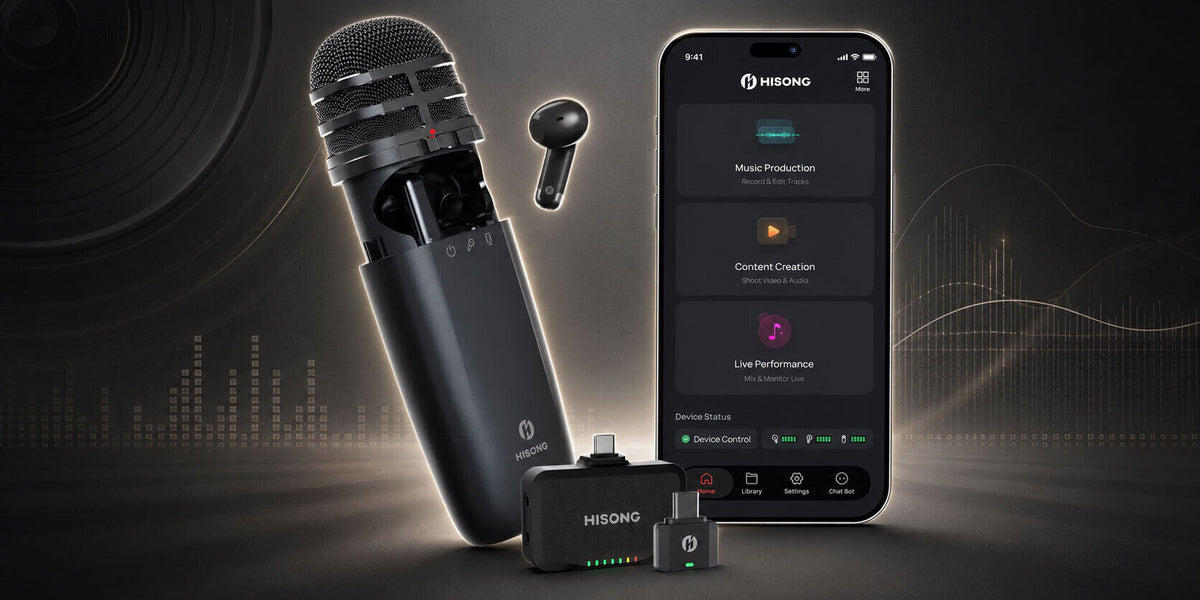

Hisong is a new kid on the block with a recent award-winning product that aims to combine microphone, interface and monitoring in one convenient, compact package. Headliner checks it out.
First Impressions about HISONG S1
Normally with product reviews, I get a chance to set up various tests and demos to check out what’s on offer in a controlled and measured way. However, after only having this kit for a few days, a situation arose that perfectly illustrated the kind of real-world scenario this product seems designed for — something that just happens to land in your pocket. No pun intended.
We recently had an event live on TikTok, and for one technical reason or another we ended up streaming from a phone. Ironically, with minutes to spare, I was still trying to work out how best to capture good-quality audio for the livestream rather than using the iPhone’s internal mic.
Hisong to the rescue.
I simply plugged the RX Mini — housed within the body of the AirStudio S1 — into the iPhone’s USB-C port and it was instantly available as an input audio device. Now it looked good and sounded good.
You can download the Hisong Link app to control the settings of the S1 — more about this later — but when you’re up against it, it’s good to know you can plug it into, or wirelessly connect it to, a phone or laptop and get an instant result.
In our kit there was also a USB-C cable and a USB-C to Lightning adaptor for those with previous-generation iPhones, but having a small wireless dongle that connected instantly was a revelation. Huge brownie points to the AirStudio before I’d even properly started the review, and great sound quality from the choice of dynamic and condenser mic capsule options — but more about this later.
The Lift Off
Before you start, I would suggest checking that your firmware is up to date on the AirStudio, or any device for that matter. The review system that arrived wasn’t fully updated, and features such as Bluetooth playback to the device were not immediately available.
Having said that, the Hisong app immediately informed me that I needed to update all the included devices: the mic, earbuds and both RX devices. Here again, the app guided me through the process and, within minutes, I was up and running.
The Hisong AirStudio S1 comes in three flavours, depending very much on your focus and what you have planned for it. Our review model was the Master package, which features a plethora of attachments and components — enough options, I might add, to cover just about any eventuality.
First is the 4-in-1 Musician Kit. This features the AirStudio S1 microphone, self-charging IEMs housed within the capsule for wireless monitoring, a choice of either dynamic or condenser capsules for recording, and remote control of the S1 via a handy app.
Also included are a USB-C cable and USB-C to A adaptor for audio and charging connection to a phone or laptop. There’s also a sturdy metal stand, which the AirStudio attaches to magnetically, and a free licence for Cubase LE should you be just starting out on your musical journey and want a more professional alternative to GarageBand.
Recording via the cable connection affords the lowest latency of all and, whether you’re recording vocals over a backing track or multiple takes into a DAW, the wired connection is the way forward.
The 5-in-1 Creator Kit includes all of the above but adds the RX Mini USB-C wireless dongle. Obviously, introducing a wireless connection also introduces latency. Hisong claims a mic-to-IEM latency of around 20ms, although I was unable to verify the round trip to a DAW. Of course, from a music production perspective, you really want to be connecting directly via USB. From a content creator’s perspective, the level of latency is far less significant.
The 6-in-1 Master Kit includes all of the above but adds the RX Plus. This essentially gives you another USB-C output port or, alternatively, you can replace the USB port with a dummy hot shoe, mount it on an SLR camera and use the mini-jack output, along with the included short jack-to-jack cable, to send audio directly into the SLR camera’s mic port. Either way, this expands the flexibility and scope of the AirStudio.

The Capsule
Ergonomically, the capsule is incredibly slick: a pocket-sized, 120g all-in-one mobile recording device with a 24-bit, 48kHz audio interface onboard. It also keeps most of the immediate components you might need close at hand. Slide open the outer casing and you’ll find the RX Mini and the earbuds neatly housed inside.
There are simple controls to turn on the mic and select either of the two onboard mic types on one side, and level up, level down and mute buttons on the other.
The inner casing is also magnetic, which snaps everything securely in place and stops anything from rattling or vibrating. It also neatly holds the earbuds to their respective charging prongs, so as you charge the microphone, you’re also charging your earbuds.
The AirStudio, as far as I can ascertain, contains two independent mic capsules. The first is a supercardioid dynamic capsule with a warmer sound when you get close to it. This is typical of the proximity effect of dynamic mics, so a little care must be taken to avoid getting too close, as this can cause plosives.
In this mode, I would strongly recommend keeping the mic close to the source and using the pop shield. Off-axis rejection is also very good in this mode, so make sure the mic stays pointing at the source, as moving off-axis will generate a significant dip in audio level.
The second is the cardioid condenser capsule. This is clearly of better quality but will also pick up far more off-axis sound. This is very useful for capturing a number of people talking, for example in a podcast. It’s also a far more open cardioid pattern, so it is able to capture more off-axis and surrounding ambient information — good for location shooting in, say, a studio control room or on an exhibition floor, two things we at Headliner love to do.

The Landing
I mentioned the Hisong Link app, which is itself a bit of a revelation. For example, you have a bunch of simple but effective options, all of which really add to the experience rather than taking time to set up.
Again, Hisong has really got this right, as moments can be lost while people are fumbling with mics, cables and cameras. With the AirStudio, all you need is your phone, the app and the AirStudio. You even have a go button under the Content Creation option that records video and audio straight to your phone from whichever camera you choose, be it front or rear-facing.
Turn on the AirStudio, pop in the earbuds, point the mic and camera and three clicks later you’re landing content. Now, you could say, “I can do that with just my phone.” Yes, you could, but the added ability to move the microphone independently of your phone vastly improves the quality of your audio while giving you far more flexibility when it comes to camera shots, especially if you’re shooting an interview.
For a small handheld mic, the quality of sound captured — especially from the condenser — stands up against mics in a similar price bracket, but of course they don’t include all the additional features you get with the AirStudio S1.
Conclusion
For Hisong’s first foray into the audio market, this is a good all-round debut. I found it incredibly easy to use straight out of the box and, although there were a couple of things it didn’t initially want to play ball with, a firmware update for the capsule and the two RX devices soon had everything talking to each other and the Bluetooth playback connection established.
I felt the earbuds could do with a couple more soft silicone options so that getting them tighter into the ear would produce more depth of sound. If you hold the buds closer to the ear canal, they clearly sound better. The fact you have to refit and remove the silicone sleeves every time you use the buds, and that everyone’s ear cavities are very different, would lend itself to a future silicone sleeve kit, maybe.
The alternative mic capsule selection is pretty neat. Switching from a supercardioid dynamic to a cardioid condenser gives you the option of a warmer, closer-sounding dynamic mic with better off-axis rejection, or a condenser for a more detailed vocal performance. It also lets you pick up more of the surrounding environment to bring your content to life, especially if you’re outside.
For a small handheld mic, the quality of sound captured — especially from the condenser — stands up against mics in a similar price bracket, but of course they don’t include all the additional features you get with the AirStudio S1.
Essentially, you have upped your game. Whether you’re a musician looking for a cost-effective way to start recording, or you need a quick way to capture ideas with a studio-quality vocal that can even have a really nice reverb, the AirStudio S1 has plenty to offer.
Add in entry-level Cubase LE, a DAW with a host of pro features, and the fact it can serve as a handheld reporter’s mic and plenty of points in between, and this really is a great product.
Having saved my bacon once already, it’s going to stay in my pocket.
Share:
HISONG AirStudio S1 Compact Mobile Recording Device