


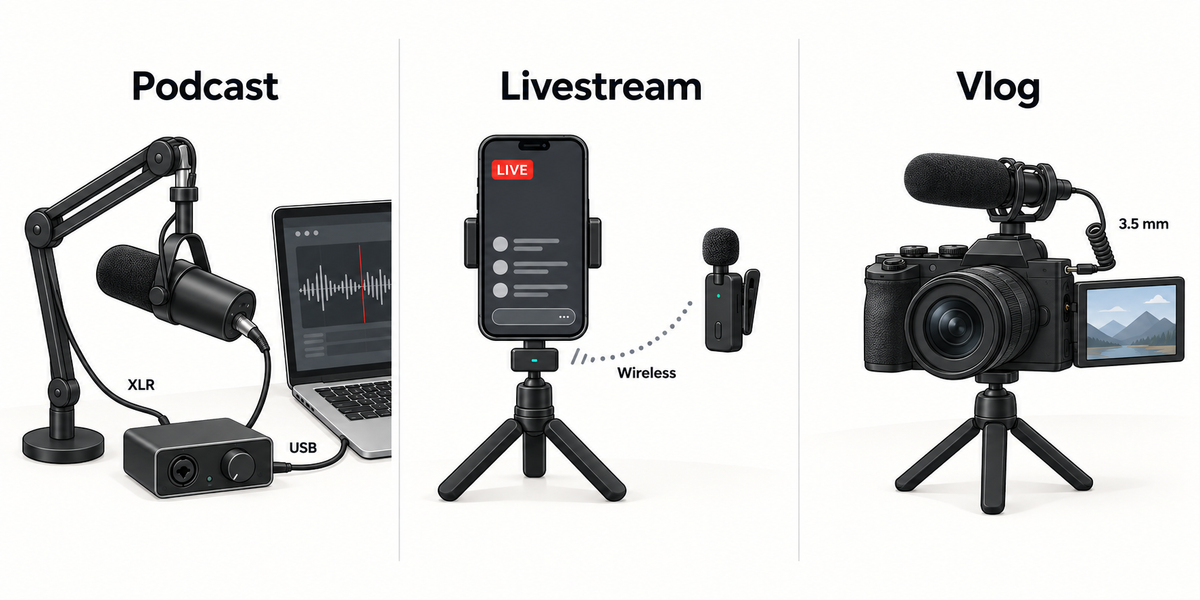

Choose a microphone setup by the job it must perform. Podcasting is usually driven by the number of speakers and the need for editable tracks. Livestreaming often depends on low-latency monitoring, stable routing, and getting audio into the live platform. Vlogging prioritizes mobility, camera or phone connection, microphone placement, and audio-video sync.
One microphone can serve more than one of these jobs, but the surrounding setup may change. Before comparing products, define five things: source count, monitoring, destination device, movement, and post-production.
The five questions that determine the setup
How many people or sound sources are live at once? One host is different from a three-person roundtable.
Where does the audio need to go? A phone, camera, computer, PA system, and livestream app may require different connections.
Who needs to monitor? A solo creator may need one monitor feed; a multi-person show may need several.
Will the creator move? A desk microphone can work beautifully in a fixed room but become awkward on a walking vlog.
How much editing follows? Separate tracks provide more control, while a finished mixed feed may reduce post-production.
These questions prevent a common mistake: choosing a microphone by its category name while ignoring the complete workflow.
Podcast setup: prioritize inputs and editable tracks
For a solo podcast, a USB microphone, an integrated recording system, or an XLR microphone with a single-input interface can all work. The decision comes down to room, monitoring, portability, and whether the show is also filmed.
For two or more in-person speakers, independent inputs become much more important. Separate microphones help maintain consistent placement and let the editor adjust speakers individually. A traditional multi-input audio interface or podcast mixer is often the clearest solution. Also plan for enough headphone outputs or a headphone distribution system if every participant must monitor.
A portable system can still fit a one-on-one interview, field conversation, or video podcast when fewer components and faster setup matter. However, do not assume that a feature labeled "dual track" provides two independent guest microphone inputs. On AirStudio S1, DualTrack™ separates the microphone/vocal signal from a backing track; it does not isolate two people captured by the same capsule. Check the exact source and track definitions.
Podcast checklist
One microphone per in-person speaker when possible
Enough independent inputs for the format
Monitoring for the people who need it
Separate tracks if individual editing is important
A room and microphone position that control reflections and background noise
Livestream setup: prioritize monitoring and stable routing
Livestreaming happens in real time, so a routing mistake cannot simply be repaired later. The setup must deliver a stable signal to the streaming device or software while letting the creator hear enough to perform confidently.
Start by identifying the live destination. A computer-based stream may accept a USB audio device. A phone stream may require a compatible receiver or adapter. For AirStudio S1, the Wireless Audio Receiver is intended primarily for supported mobile and USB workflows, while the Universal Wireless Audio Receiver expands routing to cameras, mixers, speakers, PA systems, and other external gear. Confirm the complete path before going live rather than assuming one connector covers every destination.
Monitoring is equally important for many live formats. Direct or low-latency monitoring can help a host judge level, microphone position, and obvious problems during the stream. If backing music is part of the show, verify how the system combines or separates voice and accompaniment and what the streaming platform actually receives.
HISONG AirStudio S1 is one integrated option for individual creators and compact productions. It combines microphone capture, built-in audio-interface functionality, wireless in-ear monitoring, HISONG Link control, and receiver-based connectivity. ZeroSync™ provides 24 ms low-latency wireless monitoring within the S1 monitoring path. End-to-end latency can still vary with the connected device, app, and routing, so test the actual livestream path before going live.
Livestream checklist
Confirm the exact app and destination device
Test the receiver, cable, permissions, and input selection
Monitor before the stream starts
Run a private recording or unlisted test
Check how voice, backing audio, and remote guests are routed
Vlog setup: prioritize mobility, placement, and sync
Vlogging often changes location and camera angle. A microphone that works at arm's length in a quiet room may not work when the creator walks outdoors or stands several feet from the camera.
Decide first whether the microphone stays near the creator or near the camera. Keeping it close to the voice generally improves the balance between speech and surrounding sound. Then choose the connection path: direct to a phone, into a camera, or to a separate connected recording device for synchronization in editing.
Phone-based creators may favor the Wireless Audio Receiver for supported mobile and USB workflows. Camera users should confirm the output, cable, and mounting accessories required for the Universal Wireless Audio Receiver. Current package contents and device support should be checked on the product page and support center before purchase.
If audio is recorded to a separate connected phone or computer rather than directly into the video, plan a clear synchronization method and backup strategy. If audio goes directly into the camera or phone, make a short test clip to verify that the intended input - not the device's built-in microphone - is being recorded.
Vlog checklist
Keep the microphone appropriately close to the voice
Match the receiver and cable to the phone or camera
Use wind protection outdoors
Record a test and verify the selected input
Decide whether you want direct-to-video audio or separate post-production tracks
Quick selection table
| Need | Podcasting | Livestreaming | Vlogging |
|---|---|---|---|
| Main priority | Source count and editability | Monitoring and routing stability | Mobility, placement, and sync |
| Typical destination | Computer, phone, or recorder | Computer, phone, streaming software, or mixer | Phone or camera |
| Multiple inputs | Common for guest shows | Depends on format | Often one; interviews may need two |
| Monitoring | Host and guests may need separate feeds | Important for many performers and hosts | Useful, but must not restrict movement |
| Post-production | Often detailed | Limited during the live event | Varies from direct capture to full edit |
| Best setup shape | Multi-input chain for groups; simpler system for solo shows | Tested integrated route to the live destination | Lightweight mic close to subject with verified camera/phone connection |
Where an integrated system fits - and where it does not
An integrated portable recording system is attractive when a creator or compact team moves among podcast, video, and live workflows and wants fewer separate pieces. AirStudio S1 supports macOS, Windows, iOS, and Android and offers switchable condenser and enhanced dynamic microphone modes, wireless in-ear monitoring, and HISONG Link control.
Its boundaries matter. A multi-guest podcast may still call for a dedicated multi-input interface and several microphones. Camera and PA workflows require the appropriate receiver and connection path. AirStudio S1 records through a connected device rather than onboard storage. Deep studio routing may be easier with modular equipment. Integration reduces setup steps; it does not remove the need to match sources, inputs, outputs, and storage paths.
The bottom line
For podcasting, count people, independent sources, and tracks. For livestreaming, trace and test the complete real-time route. For vlogging, keep the microphone near the voice and verify the phone or camera connection. If an individual creator or compact team moves among all three, an integrated portable system can simplify the workflow - as long as its input limits, storage path, and accessories match each destination.
FAQ
Can one microphone setup handle podcasts, livestreams, and vlogs?
Yes, if the system supports the required destinations, source count, and monitoring method. You may still need different receivers, cables, mounts, or monitoring arrangements for each task.
Do I need separate tracks for a podcast?
They are especially useful when multiple speakers need individual level, EQ, or cleanup adjustments. A solo show can work with one track if the recording is controlled. On AirStudio S1, DualTrack™ refers to the microphone/vocal signal and backing track, not separate tracks for multiple speakers.
Should vlog audio go into the camera or be recorded separately?
Both workflows are valid. Direct recording simplifies synchronization; recording to a separate connected device can offer more editing control but adds a synchronization step. AirStudio S1 itself does not provide onboard storage.
Share:
What Is a Portable Recording System? How It Differs From a Traditional Recording Setup
What Is a Portable Recording System? How It Differs From a Traditional Recording Setup