


AirStudio Accessories
Build your flow. Keep it simple.
Start with one capsule.
Add only what your creative setup needs.

- Camera
- Mixer
- Speaker
Expanded outputs · compatible equipment
AirStudio S1 + AirStudio Muse
A bigger stage for your sound.
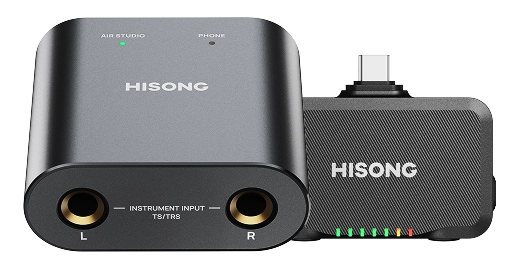
Universal Wireless Audio Receiver
Send your AirStudio mix to a camera, mixer or speaker.
Connection & recording details
- Camera audio through 3.5 mm output
- Compatible USB-C output workflows
- Works with S1 and Muse
Output expansion only. This receiver does not provide instrument input.
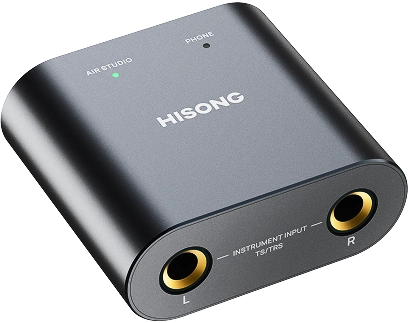

Instrument Adapter with L and R 6.35 mm TS/TRS inputs
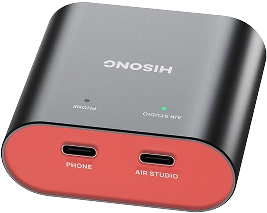
Instrument Adapter with PHONE and AIRSTUDIO USB-C ports
Plug in. Play it your way.
Instrument Adapter
Bring guitar, bass or stereo keys into your Muse setup. Record with HISONG Link and hear your performance through Muse’s wireless monitoring earbuds.
- Two 6.35 mm TS/TRS inputs
- One instrument, two instruments or stereo keys
- Dedicated USB-C ports for your phone and Muse
Two inputs.
More ways to play.
Your instrument.
Your setup.
Instrument Adapter
L / R inputs

Connect one instrument to L input.
Use compatible 6.35 mm TS/TRS audio cables.
Instrument Adapter
USB-C ports
Instrument Adapter
L / R inputs
Connect one instrument to each input.
Use compatible 6.35 mm TS/TRS audio cables.
Instrument Adapter
USB-C ports
Instrument Adapter
L / R inputs
Connect the keyboard’s left (L) and right (R) outputs to the matching L and R inputs.
Use compatible 6.35 mm TS/TRS audio cables.
Instrument Adapter
USB-C ports
How to connect
1. Connect the instrument’s output to L input. For two instruments or a stereo source, connect both L input and R input.
2. Connect PHONE to your phone or tablet and AIR STUDIO to Muse using USB-C cables.
3. Check the connection lights. Open HISONG Link, choose the instrument recording workflow and check your input levels before recording.
Inputs, devices & connection lights
- L / R inputs
- 2 × 6.35 mm TS/TRS
- PHONE
- USB-C · phone / tablet audio and data
- AIR STUDIO
- USB-C · AirStudio Muse audio and data
- Sources
- Electric guitar, bass, acoustic guitar with a pickup output, keyboards and other instruments with compatible audio outputs
- Power
- From the connected host device
Recording tracks & availability
With Muse and HISONG Link, App MultiTrack keeps vocal, USB backing and instrument audio on separate app tracks. The L/R sockets provide two input channels; they do not add extra app tracks.
Onboard DualTrack keeps MIC and combined MUSIC as two source groups. Instrument input joins MUSIC. App MultiTrack and onboard recording do not run simultaneously.
Expected Feb 2027. Timing may change. Instrument Adapter is sold separately and is not included or reserved with a Muse order.
Already in your capsule
Start with the essentials.
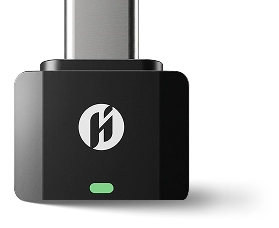
The compact Wireless Audio Receiver is included with both S1 and Muse for compatible USB-C phone, tablet and computer workflows.
Find your AirStudio